Taking manual screenshots of lecture slides while writing notes is a slow workflow. For my Machine Perception & Learning notes, I wanted a local tool that could connect Markdown sections to the most relevant PDF slide without uploading notes to a third-party service.
SlideLink is an offline Python CLI that scans Markdown lecture notes, extracts slide text and visual features from PDFs, renders matching slides as PNGs, and inserts the image links back into the notes.
What It Demonstrates
- Python package structure with installable CLI commands.
- PDF parsing and slide rendering with
PyMuPDF. - TF-IDF semantic matching with
scikit-learn. - Visual heuristics for image count, drawing density, and build-slide selection.
- Review flags for ambiguous matches and a revert command for safe rollback.
- CI-backed tests for matching, slug generation, build-slide behavior, and heading filtering.
The Matching Pipeline
SlideLink combines three signals:
1. TF-IDF Semantic Matching
The tool turns note context and slide text into TF-IDF vectors, then compares them with cosine similarity.
from sklearn.feature_extraction.text import TfidfVectorizer
from sklearn.metrics.pairwise import cosine_similarity

def find_best_slide(note_context, slides):
    vectorizer = TfidfVectorizer(stop_words="english", ngram_range=(1, 2))
    slide_matrix = vectorizer.fit_transform(slides)
    query_vec = vectorizer.transform([note_context])
    scores = cosine_similarity(query_vec, slide_matrix).ravel()
    return scores.argmax(), scores.max()
2. Math And Alias Support
For technical notes, aliases map symbols or LaTeX commands to searchable words, such as mapping \nabla to gradient.
3. Visual Slide Signals
The tool inspects images, vector drawings, and visual density so it can prefer useful diagram-heavy slides over plain text when the semantic score is close.
Workflow Safety
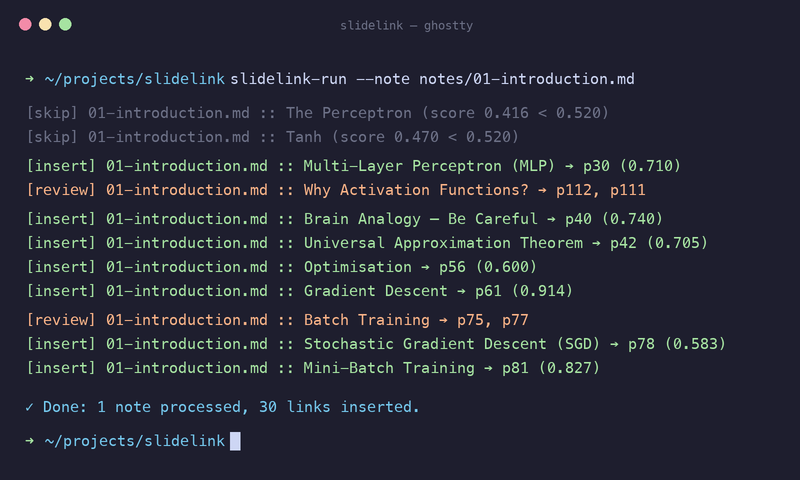
SlideLink scanning notes, remapping LaTeX, and matching lecture slides.
- Use
--dry-runto preview changes before writing files. - Ambiguous matches are marked for manual review.
slidelink-revert --revertremoves inserted screenshots and review comments.
Getting Started
git clone https://github.com/yuazi/SlideLink
cd SlideLink
pip install -e .
slidelink-run