Back: (y-11) GPU Raytracing | RTG Index | Next: (y-13) Levels of Detail
Mental Model First: The World Has More Range Than Your Screen
- Real scenes span a luminance ratio of up to 100,000,000 : 1, but an 8-bit display reproduces about 256 intensity steps clamped to [0, 1]. The whole problem is fitting the first range into the second without losing the detail the eye cares about.
- HDR rendering keeps light in floating point all the way through the pipeline. Shading, reflections, and indirect light are computed without clamping, so bright and dark regions both retain real values instead of saturating to white or crushing to black.
- Tone mapping is the lossy compression step at the end. It maps the high-dynamic-range floating-point image down to the low-dynamic-range fixed-point values a display can show, trying to preserve perceived contrast rather than absolute values.
- There is no single correct tone curve. The right mapping depends on the image content, the display, and the viewing environment, and it usually has to adapt over time the way the human eye accommodates between dark and bright scenes.
- Real-time operators trade accuracy for a fixed per-pixel budget. Reinhard, log compression, and sigmoid curves are all cheap global functions chosen so that bright values asymptote toward 1 while dark values are left roughly unchanged.
1. The Dynamic Range Problem
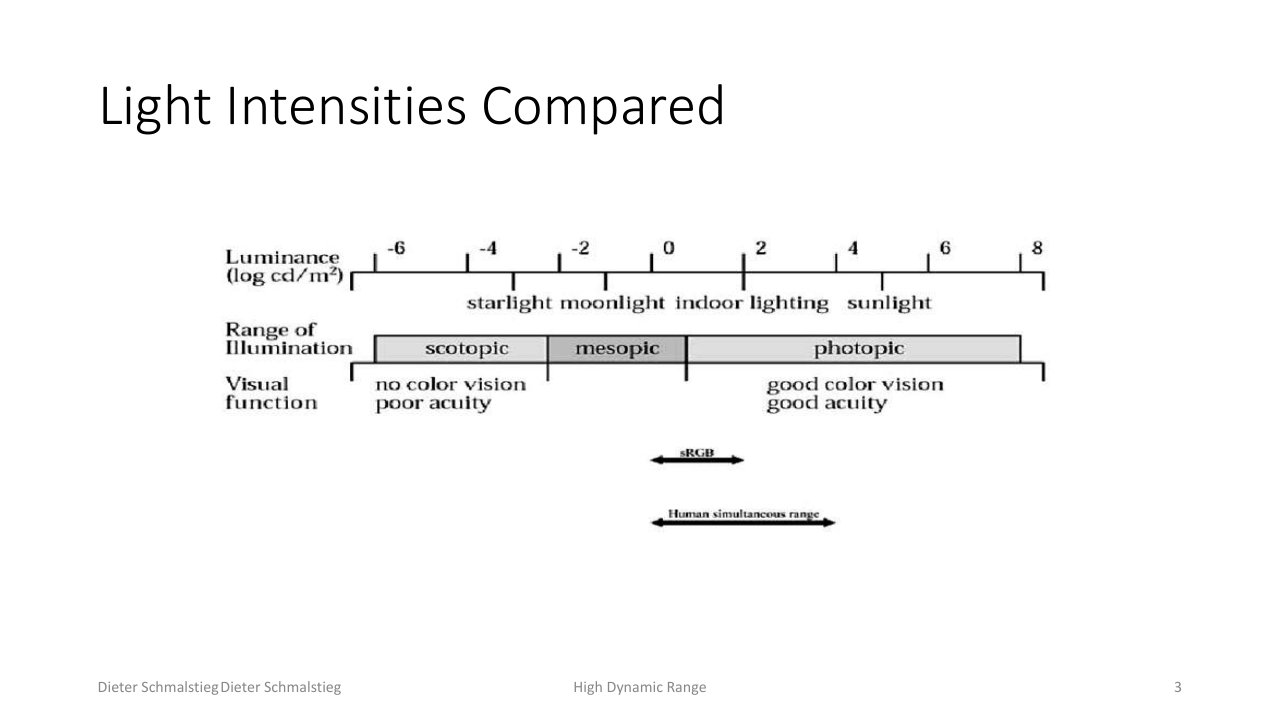
L12_Pg-03: Real-world light intensities span many orders of magnitude, from starlight to direct sun, far beyond what a monitor can show.
Standard 24-bit color gives 16.7 million colors, more than the eye can discriminate at once, so why is it not enough? The issue is not the number of colors but the range and the precision:
- 8 bits per channel is only 256 intensity steps, clamped to the fixed-point interval [0, 1].
- There is no physical unit of light energy attached to those values.
- Dynamic range is the ratio of the highest to the lowest luminance in a scene. In nature it often reaches 100,000,000 : 1.
- Humans can perceive about three orders of magnitude more contrast than a monitor can reproduce, and the eye adapts its operating point to the current scene brightness.
So a single fixed 8-bit image cannot simultaneously hold deep shadow detail and bright highlight detail the way a real scene presents them.
2. Defining Dynamic Range
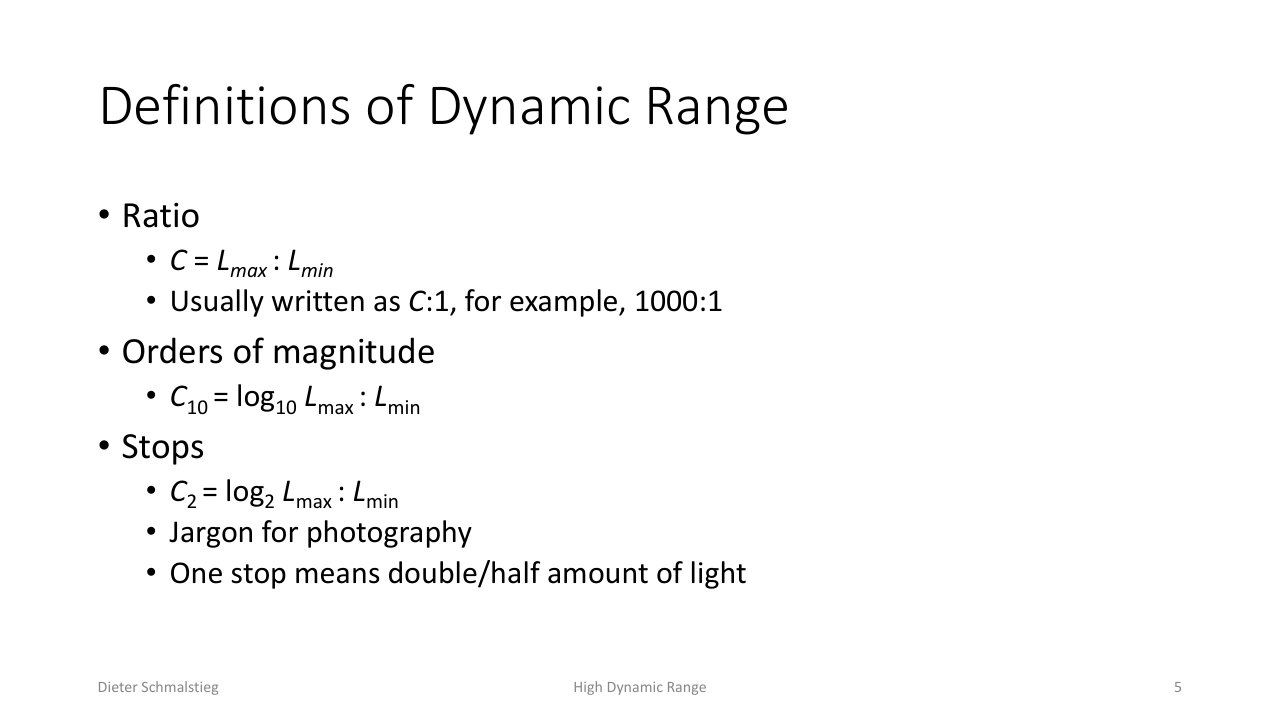
L12_Pg-05: Dynamic range expressed three ways - as a raw ratio C:1, as orders of magnitude (log base 10), or as photographic stops (log base 2).
Dynamic range is the ratio of maximum to minimum luminance, , and it gets written three ways depending on the field:
- Ratio: , for example .
- Orders of magnitude: .
- Stops: . This is photography jargon, where one stop means doubling or halving the amount of light.
💡 Intuition
Stops are a logarithmic, perceptually uniform way to talk about light because the eye responds to ratios, not absolute differences. Going from 1 to 2 units of light looks like the same step as going from 100 to 200.
3. HDR Rendering: Keep Light in Floating Point
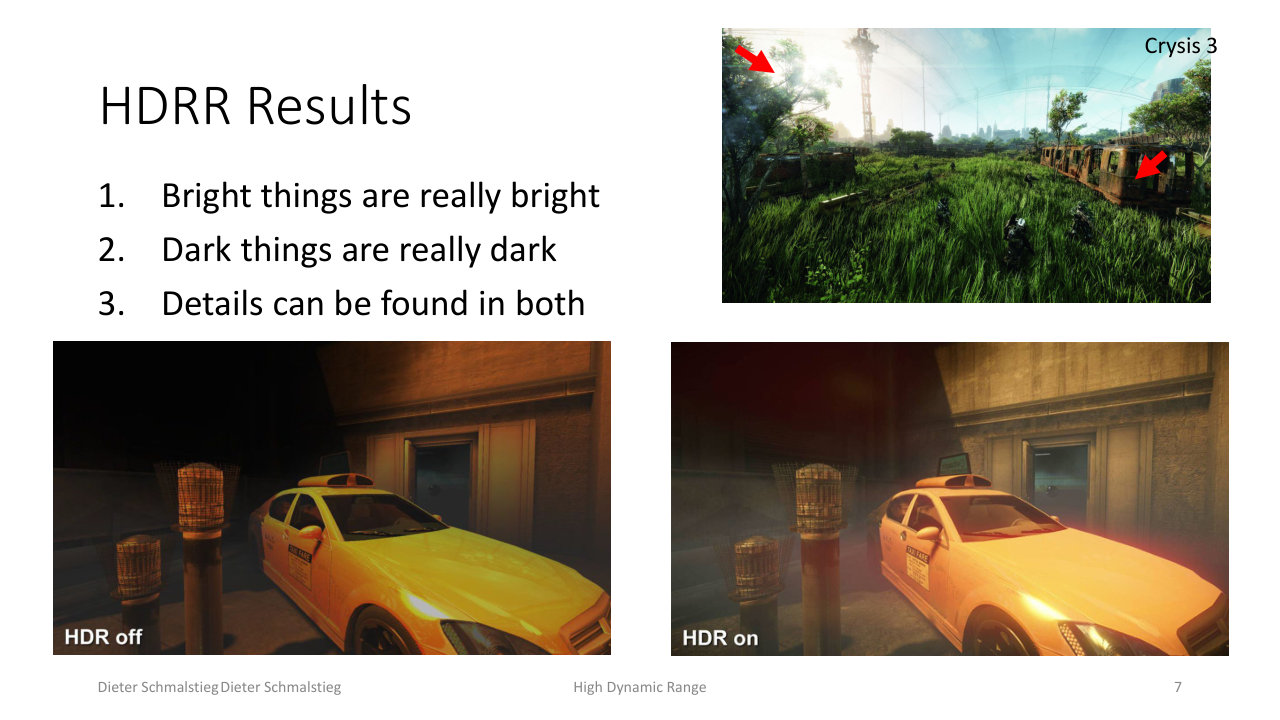
L12_Pg-07: The payoff of HDR rendering - bright things are really bright, dark things are really dark, and detail survives in both at the same time.
High dynamic range rendering (HDRR) represents intensities as floating point (commonly 3 channels of 11, 16, or 32 bits) and computes everything on the GPU in floating point. This avoids the two failures of fixed-point shading: clamping (values above 1 saturate to white) and round-off in the very dark range.
The pipeline only converts to a displayable 24-bit or 30-bit image at the final step, through tone mapping. The visible results are exactly the three properties above: highlights stay bright, shadows stay dark, and both keep their detail. Indirect-illumination effects such as bright reflections also need this numerical headroom, since a clamped buffer would throw away the energy that makes a reflection read as a reflection.
🧠 Deep Dive: A Short History
Precomputed HDR goes back to Greg Ward’s Radiance renderer (1985) and Paul Debevec’s work on lighting synthetic objects with captured environments (1997), where a cathedral window-to-obelisk ratio of 10,000:1 had to be handled. The first real-time game with HDR rendering was Half-Life 2: Lost Coast in 2004, which made the bright-to-dark adaptation effect a selling point.
4. Why Tone Mapping Is Needed
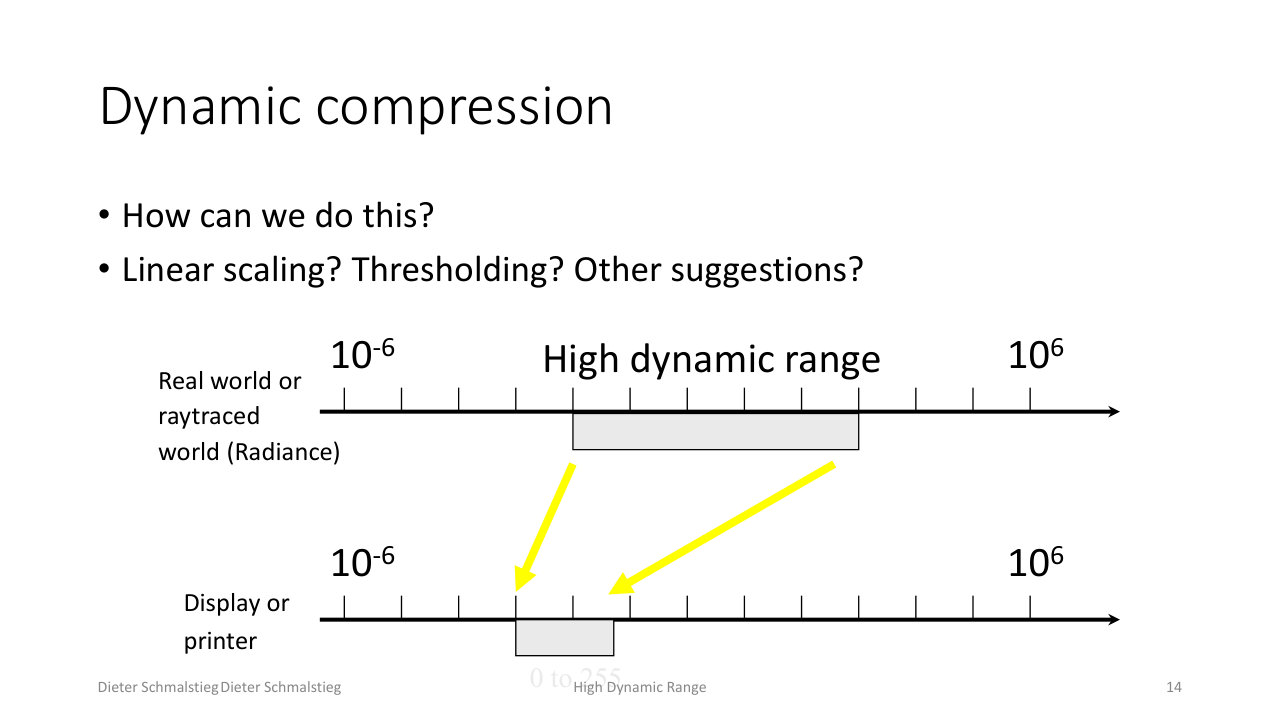
L12_Pg-14: Tone mapping is dynamic compression - squeezing the wide high-dynamic-range band of the rendered world down into the narrow 0-to-255 band a display or printer can output.
The output device has a limited dynamic range, so the floating-point HDR image must be mapped to fixed point: HDR to LDR. The objectives compete with each other:
- optimize for image detail,
- optimize for contrast,
- and produce nice-looking images, often with different parameters per image.
Tone mapping in rendering is what turns physically-based shading into something a screen can display. Games use HDR as a kind of pseudo-physically-based rendering whose goal is to simulate a camera or an eye, which greatly enhances perceived realism.
5. Why Simple Arithmetic Does Not Work
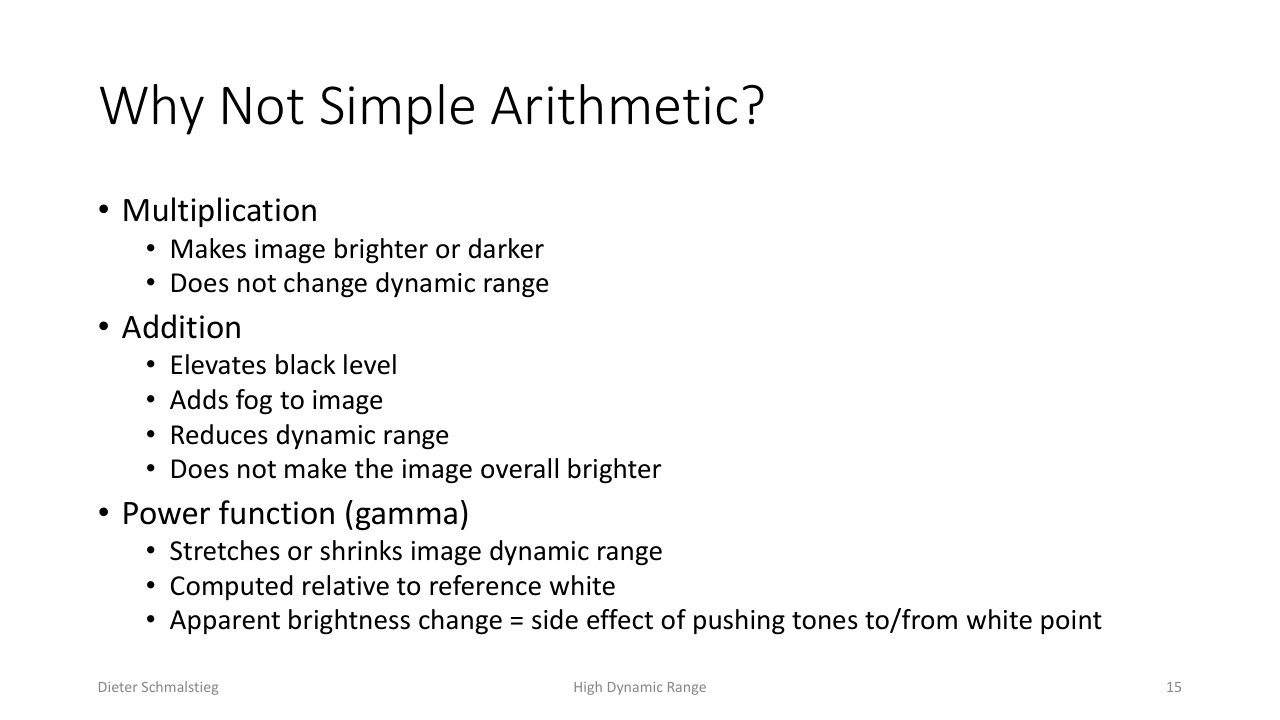
L12_Pg-15: Multiplication, addition, and gamma each fail as tone operators - none of them both compress the range and preserve the look.
The naive operators each break in a specific way:
- Multiplication makes the image brighter or darker but does not change the dynamic range (it scales both ends equally).
- Addition raises the black level, which adds a fog-like haze, reduces dynamic range, but does not actually brighten the image overall.
- Power function (gamma) stretches or shrinks the dynamic range relative to a reference white. Any apparent brightness change is a side effect of pushing tones toward or away from the white point.
None of these compresses a 10^8 : 1 range into a displayable one while keeping the image looking right, which is why a purpose-built tone curve is required.
6. The Tone Curve
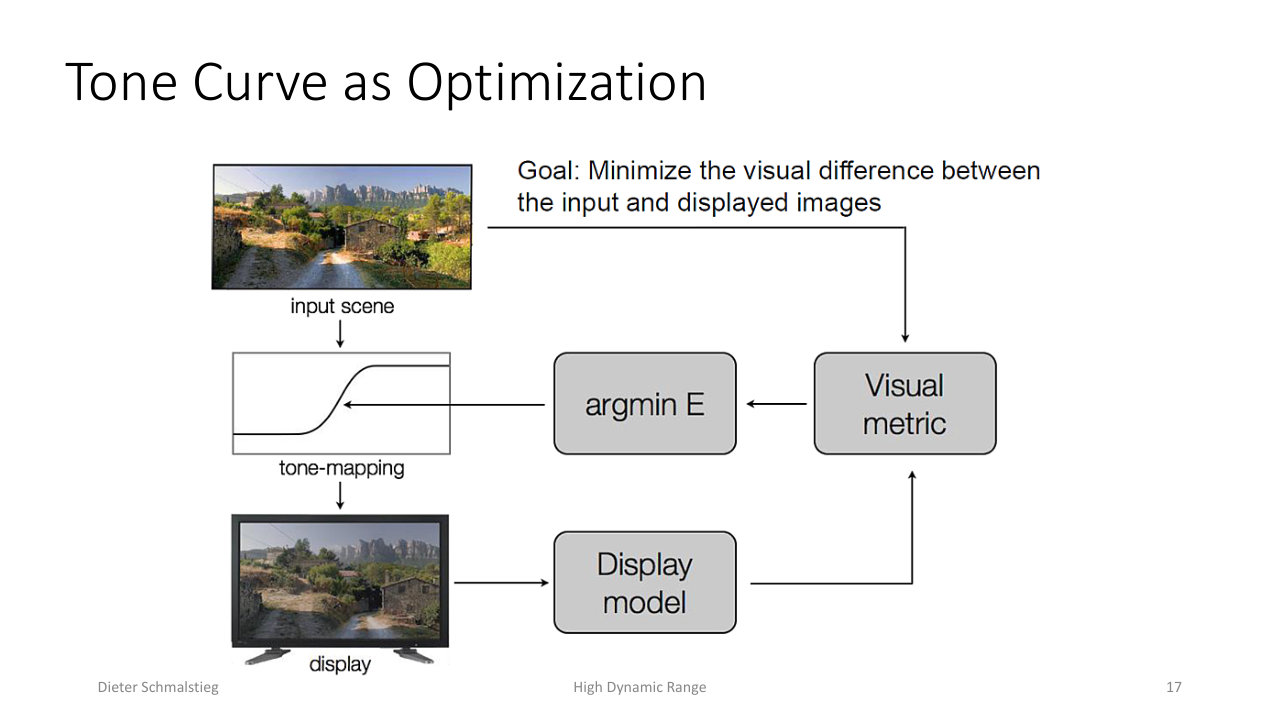
L12_Pg-17: A tone curve maps input luminance (x) to output luminance (y); its shape is the optimization target that decides which contrasts are preserved and which are compressed.
A tone-mapping operator is, at heart, a curve from scene luminance to display luminance. Designing that curve is an optimization: where the curve is steep, contrast is preserved; where it flattens, contrast is compressed. The art is putting the steep region where the eye is looking (usually the mid-tones) and compressing the extremes that carry less perceptual information.
7. Offline Tone Mapping
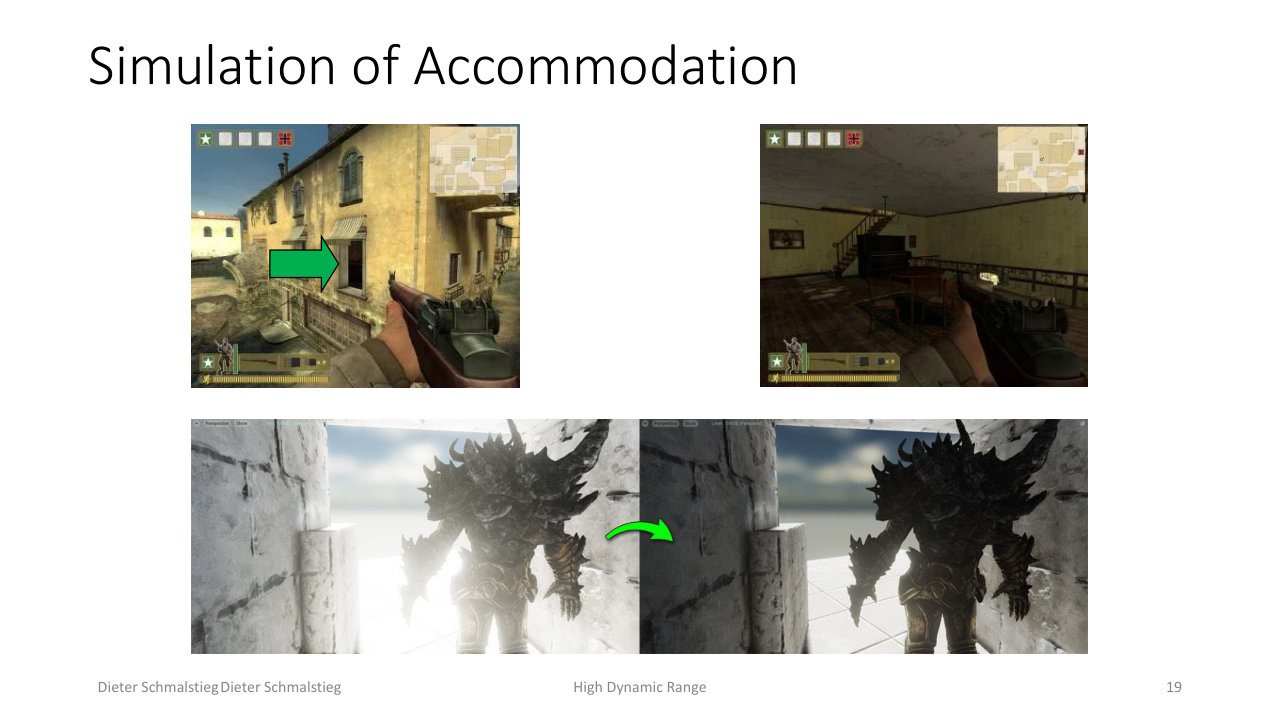
L12_Pg-19: Simulated accommodation - walking from a dark interior to a bright exterior, the operator first over-brightens the interior, then settles, mimicking how the eye adapts over time.
Offline tone mapping can afford expensive methods because it is not bound to a frame budget. It can sample and statistically analyze the whole image, simulate the accommodation of the human eye over time, and apply local tone mapping where the curve varies across the image.
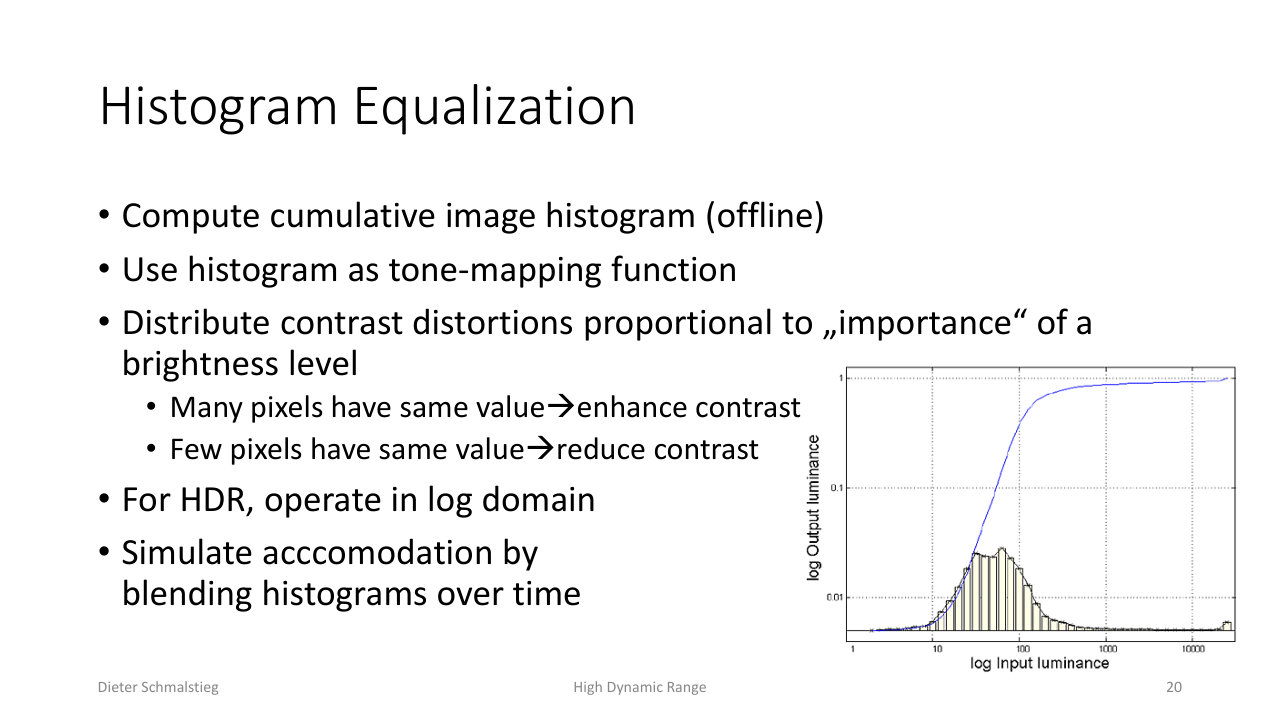
L12_Pg-20: Histogram equalization uses the cumulative image histogram as the tone-mapping function, spending contrast where many pixels share a brightness level.
Histogram equalization computes the cumulative image histogram and uses it directly as the tone curve. This distributes contrast distortion in proportion to how “important” each brightness level is: where many pixels share a value, contrast is enhanced; where few do, contrast is reduced. For HDR it operates in the log domain, and blending histograms over time simulates accommodation.
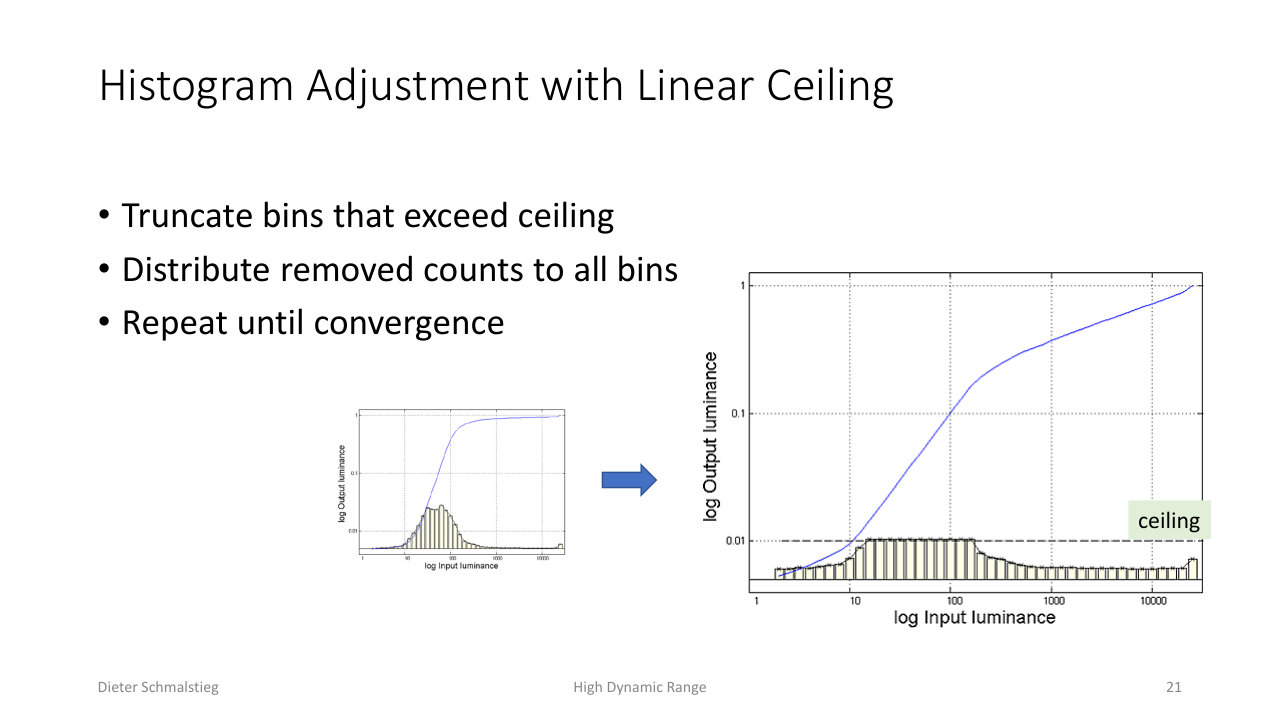
L12_Pg-21: Histogram adjustment with a linear ceiling - bins exceeding the ceiling are truncated and their counts redistributed, repeated until convergence, to bound how much contrast any one level can grab.
Plain equalization can over-amplify a dominant brightness level. The fix is a ceiling: truncate any histogram bin that exceeds it, redistribute the removed counts across all bins, and repeat until convergence. This caps the steepness of the resulting curve so a single populous level cannot dominate the contrast budget.
8. Real-Time Tone Mapping Operators
A real-time operator must be cheap and is usually global (the same function applied to every pixel of the frame). At minimum the curve must bring everything within range (asymptote at 1) and leave dark areas alone (derivative 1 at the origin). Three popular operators follow.
Reinhard Operator
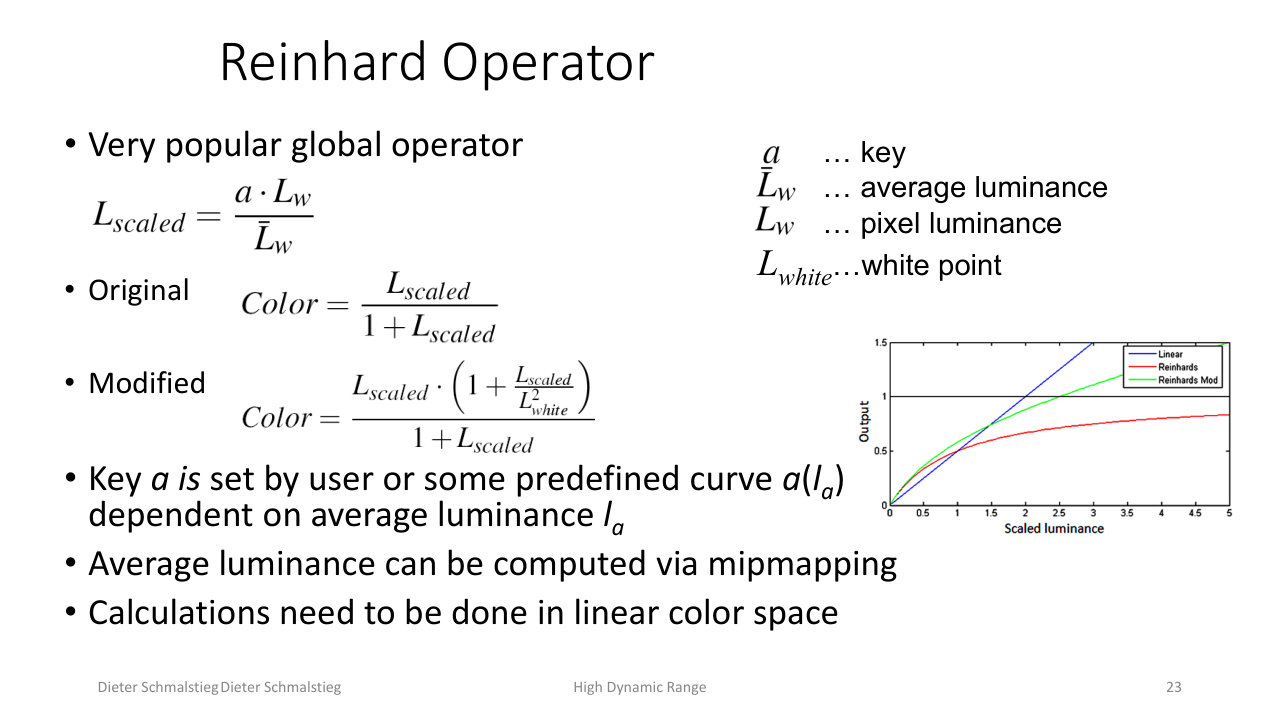
L12_Pg-23: The Reinhard operator scales pixel luminance by key over average luminance, then compresses with L/(1+L); the modified form adds a white point so highlights can reach pure white.
The Reinhard operator is the most popular global operator. It first scales pixel luminance by a user key relative to the scene’s average luminance :
then compresses. The original form,
maps every value into [0, 1) but never quite reaches 1. The modified form introduces a white point so that highlights at or above it map to pure white:
The key can be set by the user or driven by a curve that depends on average luminance, which can be computed cheaply by mipmapping the frame down to a single texel. All of this must be done in linear color space.
Log Compression
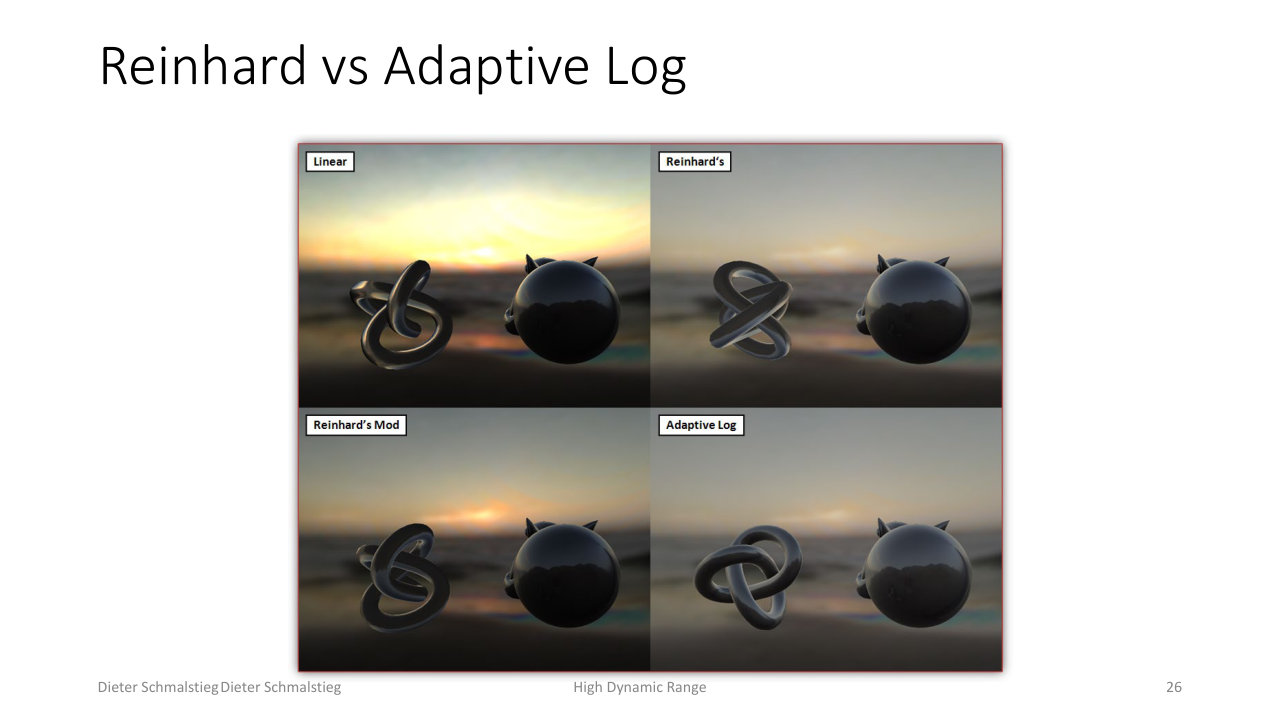
L12_Pg-26: Reinhard versus adaptive log compression on the same scene - log compression emulates perception and adapts via its base, but exaggerates the very darkest and brightest regions.
Log compression (used in CryEngine 2, for example) takes the logarithm of the HDR luminance. It is fast and emulates human perception, and changing the log base simulates adaptation. The downside is that it exaggerates extremely dark and bright areas compared with a sigmoid.
Sigmoid Curve
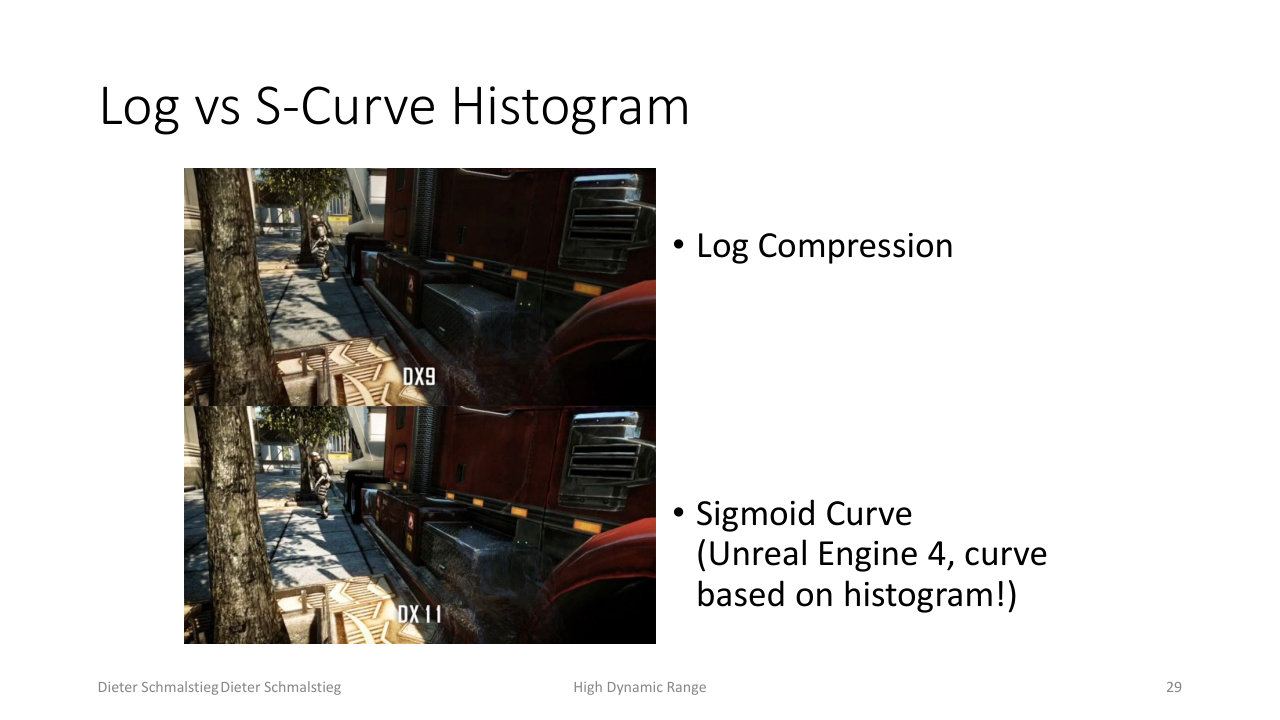
L12_Pg-29: Log compression versus a sigmoid (S-curve) tone mapping; Unreal Engine 4 builds its sigmoid from the image histogram, giving a film-like response with gentle highlight and shadow roll-off.
A sigmoid (S-curve) mimics the response of analog film. It is fast to compute, rolls off gently at both ends instead of exaggerating them, and uses the log-space mean of pixel luminance as its anchor. Unreal Engine 4 derives its sigmoid from the image histogram, combining the adaptivity of histogram methods with the smooth film look of an S-curve.
💡 Intuition
All three operators share the same skeleton: pick an exposure (average luminance or key), then pass the result through a monotonic curve that is near-linear in the dark and flattens toward 1 in the bright. They differ only in the shape of that flattening and how the exposure adapts.
9. Display-Adaptive Tone Mapping
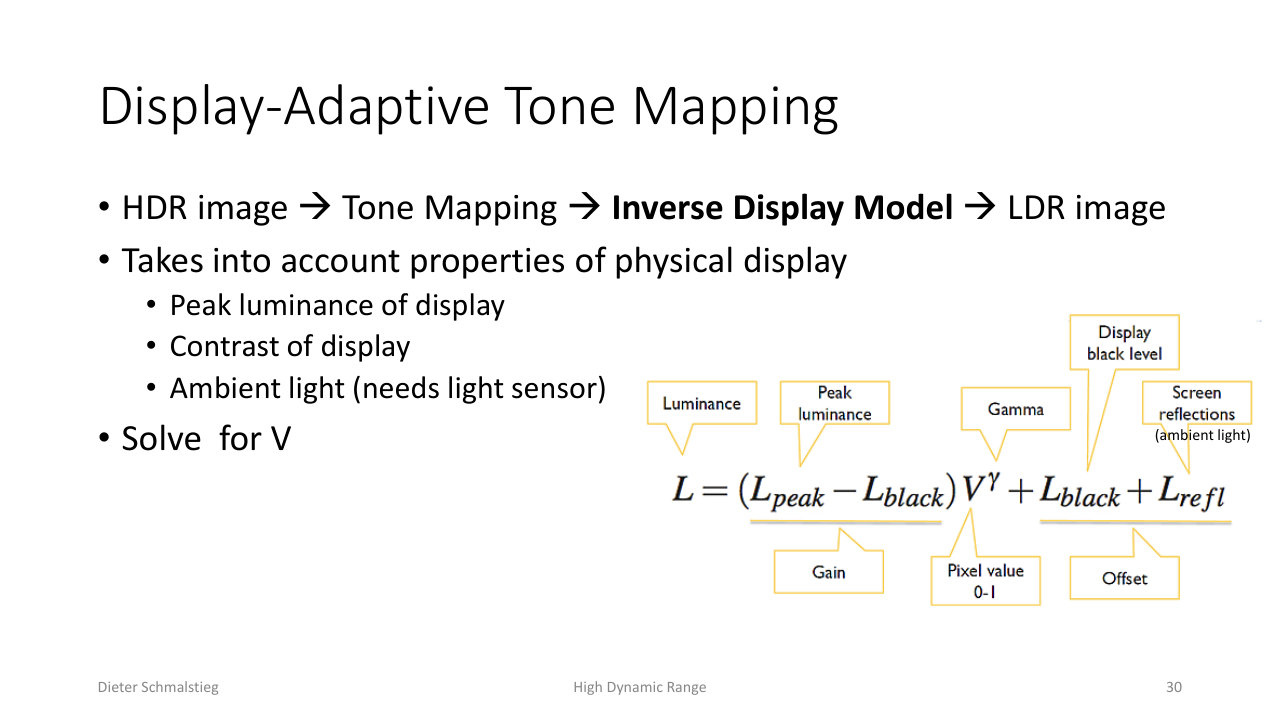
L12_Pg-30: Display-adaptive tone mapping inverts a model of the physical display - peak luminance, contrast, and measured ambient light - so the mapped image looks right under the actual viewing conditions.
Tone mapping can also account for the physical display and environment. A display-adaptive operator chains an HDR image through tone mapping and an inverse display model, solving for the values that, after the real display reproduces them, look correct. It takes into account the display’s peak luminance and contrast and the ambient light in the room (which needs a light sensor). The same content is mapped differently for a dark room than for direct sunlight.
10. HDR Output Devices and Bandwidth
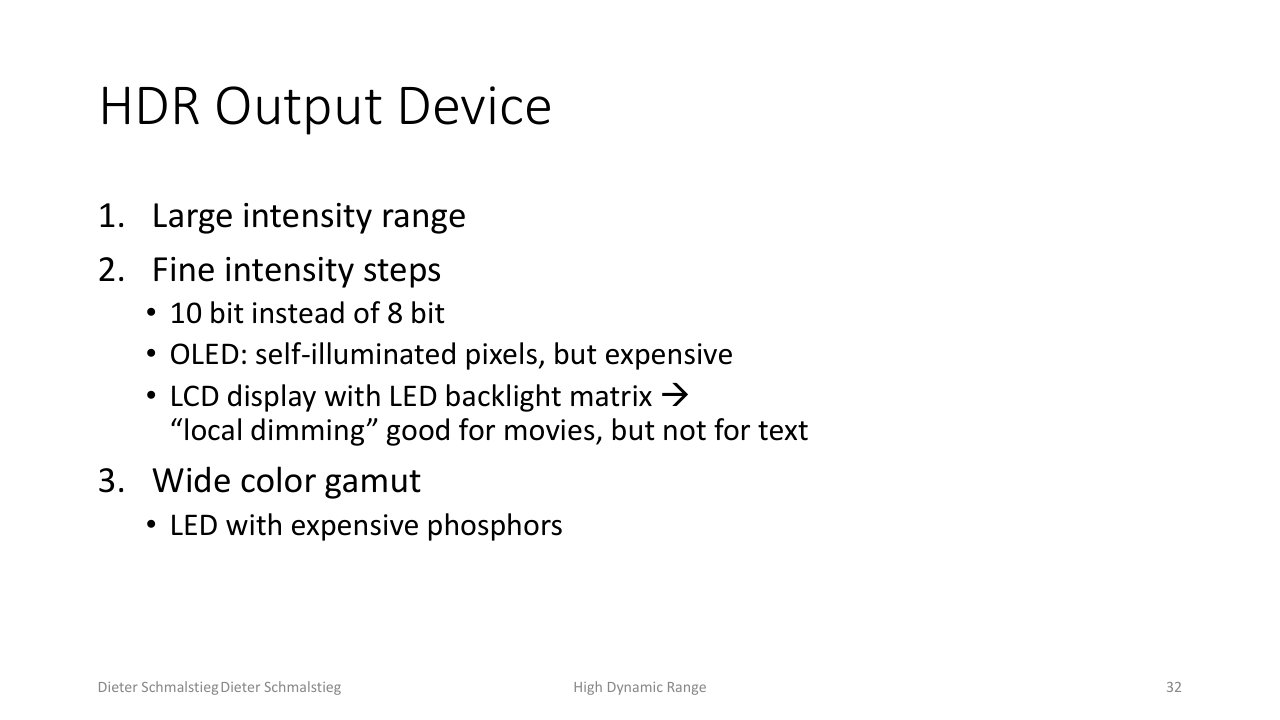
L12_Pg-32: A true HDR display needs a large intensity range, fine intensity steps (10-bit, OLED self-emissive pixels or LCD with local-dimming LED backlight), and a wide color gamut.
A real HDR output device needs three things:
- a large intensity range,
- fine intensity steps: 10 bits instead of 8. OLED gives self-illuminated pixels but is expensive; an LCD with a local-dimming LED backlight matrix works well for movies but poorly for text,
- a wide color gamut, which needs LEDs with expensive phosphors.
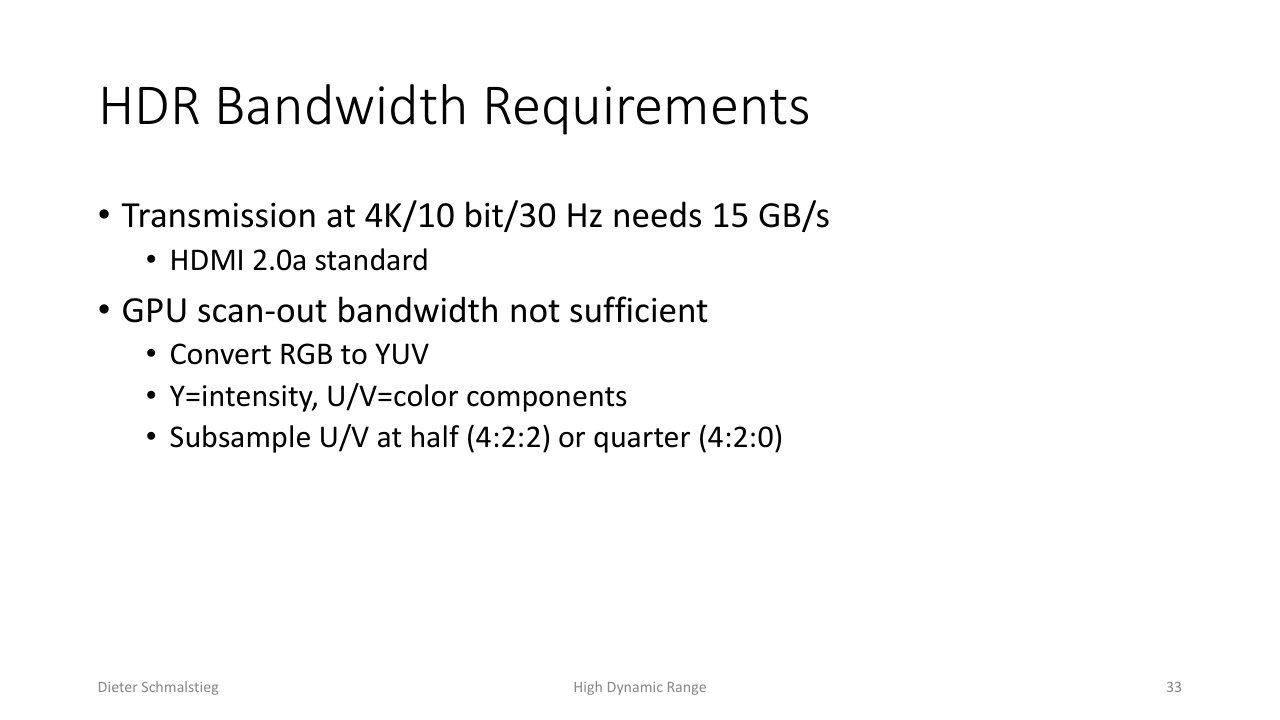
L12_Pg-33: HDR pushes display bandwidth - 4K at 10-bit and 30 Hz needs about 15 GB/s, so the signal is converted to YUV and the color channels are subsampled (4:2:2 or 4:2:0).
HDR also stresses the link to the display. Scanning out 4K at 10 bits and 30 Hz needs roughly 15 GB/s, around the HDMI 2.0a limit and beyond comfortable GPU scan-out bandwidth. The standard trick is to convert RGB to YUV (Y is intensity, U and V are color) and subsample the chroma channels to half (4:2:2) or a quarter (4:2:0), since the eye is far more sensitive to luminance detail than to color detail.
Applied Exam Focus
- The problem: scenes span up to 10^8 : 1 luminance, displays show about 256 clamped steps; the eye perceives roughly three orders of magnitude more contrast than a monitor and adapts its operating point.
- HDR rendering: keep light in floating point (11/16/32-bit) through the whole pipeline to avoid clamping and round-off, then tone map only at the final step.
- Dynamic range units: ratio , orders of magnitude (), or stops (, one stop = double/half light).
- Why simple math fails: multiplication does not change range, addition raises black level and adds fog, gamma stretches range around a white point. None compresses range while preserving the look.
- Tone curve: steep where contrast must be preserved (mid-tones), flat where it is compressed (extremes); a real-time curve must asymptote at 1 and have derivative 1 at the origin.
- Reinhard: , then , or the modified form with a white point ; average luminance via mipmapping, computed in linear space.
- Log vs sigmoid: log compression emulates perception and adapts by base but exaggerates extremes; the sigmoid mimics film, rolls off gently, and (in UE4) is built from the histogram.
- Offline methods: histogram equalization uses the cumulative histogram as the curve, with a linear ceiling to bound contrast; can simulate eye accommodation over time.
- Display-adaptive: invert a display model (peak luminance, contrast, ambient light) so the result looks right under real viewing conditions.
- HDR displays and bandwidth: 10-bit, OLED or local-dimming LCD, wide gamut; 4K/10-bit/30 Hz needs about 15 GB/s, handled by RGB-to-YUV plus chroma subsampling (4:2:2 / 4:2:0).
Self-Check
- Why is an 8-bit-per-channel image insufficient to represent a real scene, given that 24-bit color already exceeds what the eye can discriminate?
Answer
The limitation is range and precision, not color count. 8 bits gives only 256 intensity steps clamped to [0, 1], with no physical light unit. Real scenes span luminance ratios up to 100,000,000 : 1, and the eye perceives about three orders of magnitude more contrast than a monitor can show while adapting its operating point. A single fixed 8-bit image cannot hold deep shadow detail and bright highlight detail at the same time the way a real scene does.
- What does HDR rendering keep in floating point, and what two numerical failures does that avoid?
Answer
HDR rendering keeps intensities in floating point (3 channels of 11, 16, or 32 bits) and computes shading, reflections, and indirect light on the GPU in floating point through the entire pipeline. This avoids clamping (values above 1 saturating to white) and round-off errors in the very dark range. Conversion to a displayable 24- or 30-bit image happens only at the final tone-mapping step.
- Why do multiplication, addition, and gamma all fail as tone-mapping operators?
Answer
Multiplication scales both ends of the range equally, so it brightens or darkens but does not change dynamic range. Addition raises the black level, adding a fog-like haze and reducing dynamic range without actually brightening the image. Gamma stretches or shrinks range relative to a reference white, with any brightness change being a side effect of pushing tones toward or away from the white point. None of them compresses a huge range into a displayable one while preserving the image’s look.
- Write the original and modified Reinhard operators and explain the role of the white point.
Answer
First scale pixel luminance by the key and average luminance: . The original operator is , which maps everything into [0, 1) but never reaches 1, so the brightest highlights can never be pure white. The modified operator introduces a white point so that values at or above it map to pure white, restoring true highlights. Both must be computed in linear color space, and average luminance is typically found by mipmapping the frame to one texel.
- Contrast log compression with a sigmoid tone curve.
Answer
Log compression takes the logarithm of HDR luminance. It is fast, emulates human perception, and can simulate adaptation by changing the log base, but it exaggerates the extremely dark and bright regions. A sigmoid (S-curve) mimics analog film: it rolls off gently at both ends instead of exaggerating them and is anchored on the log-space mean luminance. Unreal Engine 4 builds its sigmoid from the image histogram, combining histogram adaptivity with a smooth, film-like response.
- What does a display-adaptive tone-mapping operator take into account that a plain global operator does not, and how does it use that information?
Answer
It accounts for the physical display and viewing environment: the display’s peak luminance and contrast, and the ambient light in the room (measured with a light sensor). It chains the HDR image through tone mapping and an inverse display model and solves for the output values that, once reproduced by the actual display under the actual ambient light, look correct. The same content is therefore mapped differently in a dark room than in direct sunlight.
- Why is RGB-to-YUV conversion with chroma subsampling used when driving an HDR display?
Answer
HDR scan-out is bandwidth-heavy: 4K at 10 bits and 30 Hz needs about 15 GB/s, near the HDMI 2.0a limit and beyond comfortable GPU scan-out bandwidth. Converting RGB to YUV separates intensity (Y) from color (U, V). Because the eye is much more sensitive to luminance detail than to color detail, the chroma channels can be subsampled to half (4:2:2) or a quarter (4:2:0) resolution, cutting bandwidth with little perceptible loss.
Back: (y-11) GPU Raytracing | RTG Index | Next: (y-13) Levels of Detail